About Tico: Cutout|Collage|Scrapbook
It’s never been so easy for creating collages on your phone. Unleash Your Creativity and Imagination. Effortlessly cut out with lightning speed, you could either use the 'Smart Cutout' feature within the 'Tico' app with...
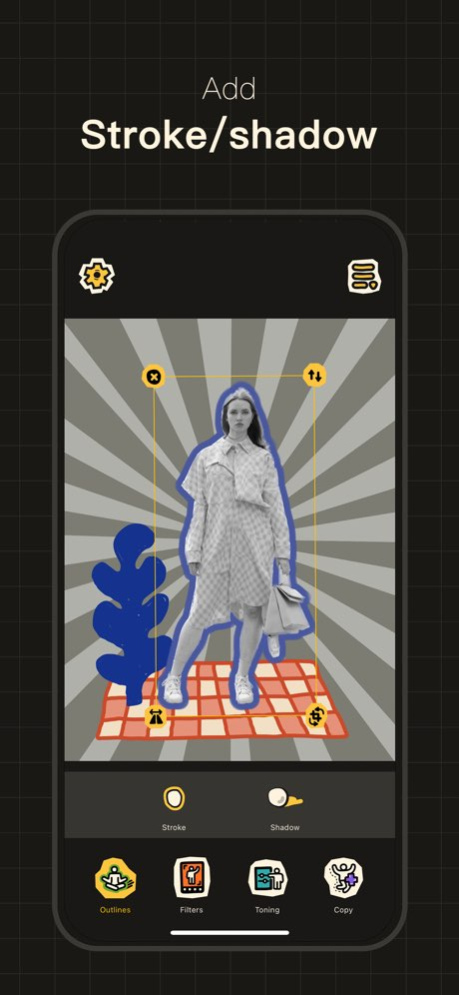
It’s never been so easy for creating collages on your phone. Unleash Your Creativity and Imagination. Effortlessly cut out with lightning speed, you could either use the 'Smart Cutout' feature within the 'Tico' app with one-click, or simply long-press a photo from Photos and drag it onto the 'Tico' canvas for cutting out. Thanks to robust system support, all cutout operations are performed locally, ensuring enhanced photo security. Features: 1. Unlimited drag and drop to add cutouts; 2. Add strokes, shadows and fancy outlines to cutouts; 3. Decorate the cutouts with filters and color adjustments; 4. Rotate, flip, copy the cutout. 5. Change the canvas background color. The "Intelligent Color" function will automatically recommend colors for you according to the existing cutouts; 6. Add background patterns; 7. Add texts; 8. Add various Tico exclusive stickers; 9. Choose multiple ratios of the canvas to meet different occasions. Enjoy! # Tico Pro 1. Infinitely drag and drop cutouts from the Photos app; 2. Unlock all stickers; 3. Unlock color pickers of background color / stroke color. # ABOUT SUBSCRIPTION . Payment will be charged to your iTunes account at confirmation of purchase and will automatically renew (at the duration/price selected) unless auto-renew is turned off at least 24 hrs before the end of the current period. . Account will be charged for renewal within 24-hours prior to the end of the current period . Current subscription may not be cancelled during the active subscription period; however, you can manage your subscription and/or turn off auto-renewal by visiting your iTunes Account Settings after purchase. Privacy Policy: https://wala.cool/private/privacy_tico.html Terms of Use: https://wala.cool/private/terms_tico.html
Version History - Brand new stickers are here! - New asset management page for better organization. 4.5 Jul 25 Fixed some bugs. 4.4 Jun 28 Fixed some bugs. Recent Update: Photo Booth is Live: Retro bursts & instant collages. - Choose from single, 2-grid, 3-grid, or 4-grid layouts. - Real-Time Customization: Filters, Backgrounds & Beauty Mode. - Import your existing photos to generate retro photo booth strips. 4.3 Jun 18 Photo Booth is Live: Retro bursts & instant collages. - Choose from single, 2-grid, 3-grid, or 4-grid layouts. - Real-Time Customization: Filters, Backgrounds & Beauty Mode. - Import your existing photos to generate retro photo booth strips. 4.2 Jun 13 New: Snap & Collect Effortlessly collect the little objects that brighten your day simply by snapping a picture. Tico offers three distinct saving modes to fit your unique visual diary style: Cutout Mode | Clipping Mode | Stamp Mode 4.1 May 18 Brush tool is now live —— Markers, crayons, and pens, paired with different colors, make your collage truly unique. Freehand doodle and sketch lines to bring your brilliant ideas to life. 4.0 Apr 17 1. “Project Library” has finally arrived to save every creation you make. Now, your carefully designed collages can be safely stored in the Project Library, where you can edit and download them at any time. The project duplication feature is also supported, allowing you to create new works using your existing templates. 2. Fixed some bugs of the layers feature. 3.9 Mar 29 New Feature — Layers - Use the layer dragging feature to quickly adjust the hierarchy of elements on the canvas; - Use the layer locking feature to temporarily lock elements, making layout operations easier. 3.8 Mar 7 Added a large collection of adorable and exquisite stickers. 3.7 Feb 4 Fixed some bugs. 3.6 11/17/2025 Fixed the cutout library bug. 3.5 10/19/2025 Fixed some bugs 3.4 12/16/2024 1. Added dashed outline with adjustable dash length. 2. Added distance adjustment for the outline. 3. Exported photos are now available in three sizes: large, medium, and small. 4. Optimized contour processing speed and cutouts clarity. 3.3 04/28/2024 1. New feature: Cutout Library. Build your own treasure trove of cutout in Tico, ready to use anytime. 2. Fixed a bug. 3.2 04/20/2024 Optimized the user experience of the cutout refine page, including: 1. Added undo and redo functions, one-click restore for accidental operations; 2. Added magnifying glass function for more precise detail handling. 3.1 04/10/2024 1. Added undo and redo buttons. 2. Optimized and added a variety of cutouts filters. 3.0 04/02/2024 A mini yet significant update: significantly enhanced the dimensions of exported images. 2.9 10/21/2023 1. Greatly improved the efficiency of image smart cutout and smudging. 2. Fixed some subtle bugs. Recent Significant Update - one-click 'Smart Cutout' within the App. iOS17 users can now utilize Tico's 'Smart Cutout' feature for quick and automatic extraction of all cutouts from your photos. Completely localized operation ensures photo security. 2.8 10/08/2023 New cutout method - one-click 'Smart Cutout' within the App. 1. iOS17 users can now utilize Tico's 'Smart Cutout' feature for quick and automatic extraction of all cutouts from your photos. Completely localized operation ensures photo security. 2. Apart from cutouts, you can now import a full photo onto the canvas and apply special effects. 3. Cutouts support smudge modifications. 2.7 09/13/2023 1. Added some new stickers. 2. Fixed some errors. 2.6 09/06/2023 New Feature: [Refine] For those who strive for perfection, you can now refine auto-cutouts to your liking. Just select the cutout, and under [Edit]-[Refine], you're free to manually smudge and modify the cutouts. 2.5 08/16/2023 1. Added "Fancy Outline" effect for cutouts. 2. Optimized some cutouts effects for improved quality. 3. Further enhanced the speed of cutouts and stickers clicking experience. 2.4 07/15/2023 1. New feature: Replace the cutouts. (Select the cutout to replace, drag and drop the new one from your Photos to the original position, and it will be quickly replaced). 2. Added a new set of retro-style stickers. 3. Further optimized memory usage. 2.3 05/28/2023 Fixed a crash bug. 1. Added a fun cutout effect - Clipping Effect, get an exquisite collage style instantly. 2. Added an "Offset" feature to the cutout stroke effect, making the strokes more distinctive. 2.2 05/18/2023 1. Added a fun cutout effect - Clipping Effect, get an exquisite collage style instantly. 2. Added an "Offset" feature to the cutout stroke effect, making the strokes more distinctive. 2.1 05/18/2023
Previous Versions
Here you can find the changelog of Tico: Cutout|Collage|Scrapbook since it was posted on our website on 2023-10-04 14:08:42.
The latest version is 4.5 and it was updated on 2026-10-07 00:16:43. See below the changes in each version.
Tico: Cutout|Collage|Scrapbook version 4.5
Updated At: 2026-10-06
Changes: Version History - Brand new stickers are here!
- New asset management page for better organization. 4.5 Jul 25 Fixed some bugs. 4.4 Jun 28 Fixed some bugs.
Recent Update:
Photo Booth is Live: Retro bursts & instant collages.
- Choose from single, 2-grid, 3-grid, or 4-grid layouts.
- Real-Time Customization: Filters, Backgrounds & Beauty Mode.
- Import your existing photos to generate retro photo booth strips. 4.3 Jun 18 Photo Booth is Live: Retro bursts & instant collages.
- Choose from single, 2-grid, 3-grid, or 4-grid layouts.
- Real-Time Customization: Filters, Backgrounds & Beauty Mode.
- Import your existing photos to generate retro photo booth strips. 4.2 Jun 13 New: Snap & Collect
Effortlessly collect the little objects that brighten your day simply by snapping a picture.
Tico offers three distinct saving modes to fit your unique visual diary style:
Cutout Mode | Clipping Mode | Stamp Mode 4.1 May 18 Brush tool is now live ——
Markers, crayons, and pens, paired with different colors, make your collage truly unique.
Freehand doodle and sketch lines to bring your brilliant ideas to life. 4.0 Apr 17 1. “Project Library” has finally arrived to save every creation you make.
Now, your carefully designed collages can be safely stored in the Project Library, where you can edit and download them at any time.
The project duplication feature is also supported, allowing you to create new works using your existing templates.
2. Fixed some bugs of the layers feature. 3.9 Mar 29 New Feature — Layers
- Use the layer dragging feature to quickly adjust the hierarchy of elements on the canvas;
- Use the layer locking feature to temporarily lock elements, making layout operations easier. 3.8 Mar 7 Added a large collection of adorable and exquisite stickers. 3.7 Feb 4 Fixed some bugs. 3.6 11/17/2025 Fixed the cutout library bug. 3.5 10/19/2025 Fixed some bugs 3.4 12/16/2024 1. Added dashed outline with adjustable dash length.
2. Added distance adjustment for the outline.
3. Exported photos are now available in three sizes: large, medium, and small.
4. Optimized contour processing speed and cutouts clarity. 3.3 04/28/2024 1. New feature: Cutout Library.
Build your own treasure trove of cutout in Tico, ready to use anytime.
2. Fixed a bug. 3.2 04/20/2024 Optimized the user experience of the cutout refine page, including:
1. Added undo and redo functions, one-click restore for accidental operations;
2. Added magnifying glass function for more precise detail handling. 3.1 04/10/2024 1. Added undo and redo buttons.
2. Optimized and added a variety of cutouts filters. 3.0 04/02/2024 A mini yet significant update: significantly enhanced the dimensions of exported images. 2.9 10/21/2023 1. Greatly improved the efficiency of image smart cutout and smudging.
2. Fixed some subtle bugs.
Recent Significant Update - one-click 'Smart Cutout' within the App.
iOS17 users can now utilize Tico's 'Smart Cutout' feature for quick and automatic extraction of all cutouts from your photos. Completely localized operation ensures photo security. 2.8 10/08/2023 New cutout method - one-click 'Smart Cutout' within the App.
1. iOS17 users can now utilize Tico's 'Smart Cutout' feature for quick and automatic extraction of all cutouts from your photos. Completely localized operation ensures photo security.
2. Apart from cutouts, you can now import a full photo onto the canvas and apply special effects.
3. Cutouts support smudge modifications. 2.7 09/13/2023 1. Added some new stickers.
2. Fixed some errors. 2.6 09/06/2023 New Feature: [Refine]
For those who strive for perfection, you can now refine auto-cutouts to your liking. Just select the cutout, and under [Edit]-[Refine], you're free to manually smudge and modify the cutouts. 2.5 08/16/2023 1. Added "Fancy Outline" effect for cutouts.
2. Optimized some cutouts effects for improved quality.
3. Further enhanced the speed of cutouts and stickers clicking experience. 2.4 07/15/2023 1. New feature: Replace the cutouts.
(Select the cutout to replace, drag and drop the new one from your Photos to the original position, and it will be quickly replaced).
2. Added a new set of retro-style stickers.
3. Further optimized memory usage. 2.3 05/28/2023 Fixed a crash bug.
1. Added a fun cutout effect - Clipping Effect, get an exquisite collage style instantly.
2. Added an "Offset" feature to the cutout stroke effect, making the strokes more distinctive. 2.2 05/18/2023 1. Added a fun cutout effect - Clipping Effect, get an exquisite collage style instantly.
2. Added an "Offset" feature to the cutout stroke effect, making the strokes more distinctive. 2.1 05/18/2023
Tico: Cutout|Collage|Scrapbook version 4.5
Updated At: 2026-07-29
Changes: Version History - Brand new stickers are here!
- New asset management page for better organization. 4.5 4d ago Fixed some bugs. 4.4 Jun 28 Fixed some bugs.
Recent Update:
Photo Booth is Live: Retro bursts & instant collages.
- Choose from single, 2-grid, 3-grid, or 4-grid layouts.
- Real-Time Customization: Filters, Backgrounds & Beauty Mode.
- Import your existing photos to generate retro photo booth strips. 4.3 Jun 18 Photo Booth is Live: Retro bursts & instant collages.
- Choose from single, 2-grid, 3-grid, or 4-grid layouts.
- Real-Time Customization: Filters, Backgrounds & Beauty Mode.
- Import your existing photos to generate retro photo booth strips. 4.2 Jun 13 New: Snap & Collect
Effortlessly collect the little objects that brighten your day simply by snapping a picture.
Tico offers three distinct saving modes to fit your unique visual diary style:
Cutout Mode | Clipping Mode | Stamp Mode 4.1 May 18 Brush tool is now live ——
Markers, crayons, and pens, paired with different colors, make your collage truly unique.
Freehand doodle and sketch lines to bring your brilliant ideas to life. 4.0 Apr 17 1. “Project Library” has finally arrived to save every creation you make.
Now, your carefully designed collages can be safely stored in the Project Library, where you can edit and download them at any time.
The project duplication feature is also supported, allowing you to create new works using your existing templates.
2. Fixed some bugs of the layers feature. 3.9 Mar 29 New Feature — Layers
- Use the layer dragging feature to quickly adjust the hierarchy of elements on the canvas;
- Use the layer locking feature to temporarily lock elements, making layout operations easier. 3.8 Mar 7 Added a large collection of adorable and exquisite stickers. 3.7 Feb 4 Fixed some bugs. 3.6 11/17/2025 Fixed the cutout library bug. 3.5 10/19/2025 Fixed some bugs 3.4 12/16/2024 1. Added dashed outline with adjustable dash length.
2. Added distance adjustment for the outline.
3. Exported photos are now available in three sizes: large, medium, and small.
4. Optimized contour processing speed and cutouts clarity. 3.3 04/28/2024 1. New feature: Cutout Library.
Build your own treasure trove of cutout in Tico, ready to use anytime.
2. Fixed a bug. 3.2 04/20/2024 Optimized the user experience of the cutout refine page, including:
1. Added undo and redo functions, one-click restore for accidental operations;
2. Added magnifying glass function for more precise detail handling. 3.1 04/10/2024 1. Added undo and redo buttons.
2. Optimized and added a variety of cutouts filters. 3.0 04/02/2024 A mini yet significant update: significantly enhanced the dimensions of exported images. 2.9 10/21/2023 1. Greatly improved the efficiency of image smart cutout and smudging.
2. Fixed some subtle bugs.
Recent Significant Update - one-click 'Smart Cutout' within the App.
iOS17 users can now utilize Tico's 'Smart Cutout' feature for quick and automatic extraction of all cutouts from your photos. Completely localized operation ensures photo security. 2.8 10/08/2023 New cutout method - one-click 'Smart Cutout' within the App.
1. iOS17 users can now utilize Tico's 'Smart Cutout' feature for quick and automatic extraction of all cutouts from your photos. Completely localized operation ensures photo security.
2. Apart from cutouts, you can now import a full photo onto the canvas and apply special effects.
3. Cutouts support smudge modifications. 2.7 09/13/2023 1. Added some new stickers.
2. Fixed some errors. 2.6 09/06/2023 New Feature: [Refine]
For those who strive for perfection, you can now refine auto-cutouts to your liking. Just select the cutout, and under [Edit]-[Refine], you're free to manually smudge and modify the cutouts. 2.5 08/16/2023 1. Added "Fancy Outline" effect for cutouts.
2. Optimized some cutouts effects for improved quality.
3. Further enhanced the speed of cutouts and stickers clicking experience. 2.4 07/15/2023 1. New feature: Replace the cutouts.
(Select the cutout to replace, drag and drop the new one from your Photos to the original position, and it will be quickly replaced).
2. Added a new set of retro-style stickers.
3. Further optimized memory usage. 2.3 05/28/2023 Fixed a crash bug.
1. Added a fun cutout effect - Clipping Effect, get an exquisite collage style instantly.
2. Added an "Offset" feature to the cutout stroke effect, making the strokes more distinctive. 2.2 05/18/2023 1. Added a fun cutout effect - Clipping Effect, get an exquisite collage style instantly.
2. Added an "Offset" feature to the cutout stroke effect, making the strokes more distinctive. 2.1 05/18/2023
Tico: Cutout|Collage|Scrapbook version 4.4
Updated At: 2026-07-22
Changes: Version History Fixed some bugs. 4.4 Jun 28 Fixed some bugs.
Recent Update:
Photo Booth is Live: Retro bursts & instant collages.
- Choose from single, 2-grid, 3-grid, or 4-grid layouts.
- Real-Time Customization: Filters, Backgrounds & Beauty Mode.
- Import your existing photos to generate retro photo booth strips. 4.3 Jun 18 Photo Booth is Live: Retro bursts & instant collages.
- Choose from single, 2-grid, 3-grid, or 4-grid layouts.
- Real-Time Customization: Filters, Backgrounds & Beauty Mode.
- Import your existing photos to generate retro photo booth strips. 4.2 Jun 13 New: Snap & Collect
Effortlessly collect the little objects that brighten your day simply by snapping a picture.
Tico offers three distinct saving modes to fit your unique visual diary style:
Cutout Mode | Clipping Mode | Stamp Mode 4.1 May 18 Brush tool is now live ——
Markers, crayons, and pens, paired with different colors, make your collage truly unique.
Freehand doodle and sketch lines to bring your brilliant ideas to life. 4.0 Apr 17 1. “Project Library” has finally arrived to save every creation you make.
Now, your carefully designed collages can be safely stored in the Project Library, where you can edit and download them at any time.
The project duplication feature is also supported, allowing you to create new works using your existing templates.
2. Fixed some bugs of the layers feature. 3.9 Mar 29 New Feature — Layers
- Use the layer dragging feature to quickly adjust the hierarchy of elements on the canvas;
- Use the layer locking feature to temporarily lock elements, making layout operations easier. 3.8 Mar 7 Added a large collection of adorable and exquisite stickers. 3.7 Feb 4 Fixed some bugs. 3.6 11/17/2025 Fixed the cutout library bug. 3.5 10/19/2025 Fixed some bugs 3.4 12/16/2024 1. Added dashed outline with adjustable dash length.
2. Added distance adjustment for the outline.
3. Exported photos are now available in three sizes: large, medium, and small.
4. Optimized contour processing speed and cutouts clarity. 3.3 04/28/2024 1. New feature: Cutout Library.
Build your own treasure trove of cutout in Tico, ready to use anytime.
2. Fixed a bug. 3.2 04/20/2024 Optimized the user experience of the cutout refine page, including:
1. Added undo and redo functions, one-click restore for accidental operations;
2. Added magnifying glass function for more precise detail handling. 3.1 04/10/2024 1. Added undo and redo buttons.
2. Optimized and added a variety of cutouts filters. 3.0 04/02/2024 A mini yet significant update: significantly enhanced the dimensions of exported images. 2.9 10/21/2023 1. Greatly improved the efficiency of image smart cutout and smudging.
2. Fixed some subtle bugs.
Recent Significant Update - one-click 'Smart Cutout' within the App.
iOS17 users can now utilize Tico's 'Smart Cutout' feature for quick and automatic extraction of all cutouts from your photos. Completely localized operation ensures photo security. 2.8 10/08/2023 New cutout method - one-click 'Smart Cutout' within the App.
1. iOS17 users can now utilize Tico's 'Smart Cutout' feature for quick and automatic extraction of all cutouts from your photos. Completely localized operation ensures photo security.
2. Apart from cutouts, you can now import a full photo onto the canvas and apply special effects.
3. Cutouts support smudge modifications. 2.7 09/13/2023 1. Added some new stickers.
2. Fixed some errors. 2.6 09/06/2023 New Feature: [Refine]
For those who strive for perfection, you can now refine auto-cutouts to your liking. Just select the cutout, and under [Edit]-[Refine], you're free to manually smudge and modify the cutouts. 2.5 08/16/2023 1. Added "Fancy Outline" effect for cutouts.
2. Optimized some cutouts effects for improved quality.
3. Further enhanced the speed of cutouts and stickers clicking experience. 2.4 07/15/2023 1. New feature: Replace the cutouts.
(Select the cutout to replace, drag and drop the new one from your Photos to the original position, and it will be quickly replaced).
2. Added a new set of retro-style stickers.
3. Further optimized memory usage. 2.3 05/28/2023 Fixed a crash bug.
1. Added a fun cutout effect - Clipping Effect, get an exquisite collage style instantly.
2. Added an "Offset" feature to the cutout stroke effect, making the strokes more distinctive. 2.2 05/18/2023 1. Added a fun cutout effect - Clipping Effect, get an exquisite collage style instantly.
2. Added an "Offset" feature to the cutout stroke effect, making the strokes more distinctive. 2.1 05/18/2023 1. Add "New Canvas“ function.
2. Fix some bugs. 2.0 05/05/2023
Tico: Cutout|Collage|Scrapbook version 4.4
Updated At: 2026-06-30
Changes: Version History Fixed some bugs. 4.4 1d ago Fixed some bugs.
Recent Update:
Photo Booth is Live: Retro bursts & instant collages.
- Choose from single, 2-grid, 3-grid, or 4-grid layouts.
- Real-Time Customization: Filters, Backgrounds & Beauty Mode.
- Import your existing photos to generate retro photo booth strips. 4.3 Jun 18 Photo Booth is Live: Retro bursts & instant collages.
- Choose from single, 2-grid, 3-grid, or 4-grid layouts.
- Real-Time Customization: Filters, Backgrounds & Beauty Mode.
- Import your existing photos to generate retro photo booth strips. 4.2 Jun 13 New: Snap & Collect
Effortlessly collect the little objects that brighten your day simply by snapping a picture.
Tico offers three distinct saving modes to fit your unique visual diary style:
Cutout Mode | Clipping Mode | Stamp Mode 4.1 May 18 Brush tool is now live ——
Markers, crayons, and pens, paired with different colors, make your collage truly unique.
Freehand doodle and sketch lines to bring your brilliant ideas to life. 4.0 Apr 17 1. “Project Library” has finally arrived to save every creation you make.
Now, your carefully designed collages can be safely stored in the Project Library, where you can edit and download them at any time.
The project duplication feature is also supported, allowing you to create new works using your existing templates.
2. Fixed some bugs of the layers feature. 3.9 Mar 29 New Feature — Layers
- Use the layer dragging feature to quickly adjust the hierarchy of elements on the canvas;
- Use the layer locking feature to temporarily lock elements, making layout operations easier. 3.8 Mar 7 Added a large collection of adorable and exquisite stickers. 3.7 Feb 4 Fixed some bugs. 3.6 11/17/2025 Fixed the cutout library bug. 3.5 10/19/2025 Fixed some bugs 3.4 12/16/2024 1. Added dashed outline with adjustable dash length.
2. Added distance adjustment for the outline.
3. Exported photos are now available in three sizes: large, medium, and small.
4. Optimized contour processing speed and cutouts clarity. 3.3 04/28/2024 1. New feature: Cutout Library.
Build your own treasure trove of cutout in Tico, ready to use anytime.
2. Fixed a bug. 3.2 04/20/2024 Optimized the user experience of the cutout refine page, including:
1. Added undo and redo functions, one-click restore for accidental operations;
2. Added magnifying glass function for more precise detail handling. 3.1 04/10/2024 1. Added undo and redo buttons.
2. Optimized and added a variety of cutouts filters. 3.0 04/02/2024 A mini yet significant update: significantly enhanced the dimensions of exported images. 2.9 10/21/2023 1. Greatly improved the efficiency of image smart cutout and smudging.
2. Fixed some subtle bugs.
Recent Significant Update - one-click 'Smart Cutout' within the App.
iOS17 users can now utilize Tico's 'Smart Cutout' feature for quick and automatic extraction of all cutouts from your photos. Completely localized operation ensures photo security. 2.8 10/08/2023 New cutout method - one-click 'Smart Cutout' within the App.
1. iOS17 users can now utilize Tico's 'Smart Cutout' feature for quick and automatic extraction of all cutouts from your photos. Completely localized operation ensures photo security.
2. Apart from cutouts, you can now import a full photo onto the canvas and apply special effects.
3. Cutouts support smudge modifications. 2.7 09/13/2023 1. Added some new stickers.
2. Fixed some errors. 2.6 09/06/2023 New Feature: [Refine]
For those who strive for perfection, you can now refine auto-cutouts to your liking. Just select the cutout, and under [Edit]-[Refine], you're free to manually smudge and modify the cutouts. 2.5 08/16/2023 1. Added "Fancy Outline" effect for cutouts.
2. Optimized some cutouts effects for improved quality.
3. Further enhanced the speed of cutouts and stickers clicking experience. 2.4 07/15/2023 1. New feature: Replace the cutouts.
(Select the cutout to replace, drag and drop the new one from your Photos to the original position, and it will be quickly replaced).
2. Added a new set of retro-style stickers.
3. Further optimized memory usage. 2.3 05/28/2023 Fixed a crash bug.
1. Added a fun cutout effect - Clipping Effect, get an exquisite collage style instantly.
2. Added an "Offset" feature to the cutout stroke effect, making the strokes more distinctive. 2.2 05/18/2023 1. Added a fun cutout effect - Clipping Effect, get an exquisite collage style instantly.
2. Added an "Offset" feature to the cutout stroke effect, making the strokes more distinctive. 2.1 05/18/2023 1. Add "New Canvas“ function.
2. Fix some bugs. 2.0 05/05/2023
Tico: Cutout|Collage|Scrapbook version 4.1
Updated At: 2026-06-09
Changes: Version History New: Snap & Collect
Effortlessly collect the little objects that brighten your day simply by snapping a picture.
Tico offers three distinct saving modes to fit your unique visual diary style:
Cutout Mode | Clipping Mode | Stamp Mode 4.1 May 18 Brush tool is now live ——
Markers, crayons, and pens, paired with different colors, make your collage truly unique.
Freehand doodle and sketch lines to bring your brilliant ideas to life. 4.0 Apr 17 1. “Project Library” has finally arrived to save every creation you make.
Now, your carefully designed collages can be safely stored in the Project Library, where you can edit and download them at any time.
The project duplication feature is also supported, allowing you to create new works using your existing templates.
2. Fixed some bugs of the layers feature. 3.9 Mar 29 New Feature — Layers
- Use the layer dragging feature to quickly adjust the hierarchy of elements on the canvas;
- Use the layer locking feature to temporarily lock elements, making layout operations easier. 3.8 Mar 7 Added a large collection of adorable and exquisite stickers. 3.7 Feb 4 Fixed some bugs. 3.6 11/17/2025 Fixed the cutout library bug. 3.5 10/19/2025 Fixed some bugs 3.4 12/16/2024 1. Added dashed outline with adjustable dash length.
2. Added distance adjustment for the outline.
3. Exported photos are now available in three sizes: large, medium, and small.
4. Optimized contour processing speed and cutouts clarity. 3.3 04/28/2024 1. New feature: Cutout Library.
Build your own treasure trove of cutout in Tico, ready to use anytime.
2. Fixed a bug. 3.2 04/20/2024 Optimized the user experience of the cutout refine page, including:
1. Added undo and redo functions, one-click restore for accidental operations;
2. Added magnifying glass function for more precise detail handling. 3.1 04/10/2024 1. Added undo and redo buttons.
2. Optimized and added a variety of cutouts filters. 3.0 04/02/2024 A mini yet significant update: significantly enhanced the dimensions of exported images. 2.9 10/21/2023 1. Greatly improved the efficiency of image smart cutout and smudging.
2. Fixed some subtle bugs.
Recent Significant Update - one-click 'Smart Cutout' within the App.
iOS17 users can now utilize Tico's 'Smart Cutout' feature for quick and automatic extraction of all cutouts from your photos. Completely localized operation ensures photo security. 2.8 10/08/2023 New cutout method - one-click 'Smart Cutout' within the App.
1. iOS17 users can now utilize Tico's 'Smart Cutout' feature for quick and automatic extraction of all cutouts from your photos. Completely localized operation ensures photo security.
2. Apart from cutouts, you can now import a full photo onto the canvas and apply special effects.
3. Cutouts support smudge modifications. 2.7 09/13/2023 1. Added some new stickers.
2. Fixed some errors. 2.6 09/06/2023 New Feature: [Refine]
For those who strive for perfection, you can now refine auto-cutouts to your liking. Just select the cutout, and under [Edit]-[Refine], you're free to manually smudge and modify the cutouts. 2.5 08/16/2023 1. Added "Fancy Outline" effect for cutouts.
2. Optimized some cutouts effects for improved quality.
3. Further enhanced the speed of cutouts and stickers clicking experience. 2.4 07/15/2023 1. New feature: Replace the cutouts.
(Select the cutout to replace, drag and drop the new one from your Photos to the original position, and it will be quickly replaced).
2. Added a new set of retro-style stickers.
3. Further optimized memory usage. 2.3 05/28/2023 Fixed a crash bug.
1. Added a fun cutout effect - Clipping Effect, get an exquisite collage style instantly.
2. Added an "Offset" feature to the cutout stroke effect, making the strokes more distinctive. 2.2 05/18/2023 1. Added a fun cutout effect - Clipping Effect, get an exquisite collage style instantly.
2. Added an "Offset" feature to the cutout stroke effect, making the strokes more distinctive. 2.1 05/18/2023 1. Add "New Canvas“ function.
2. Fix some bugs. 2.0 05/05/2023 1. Added various adjustment features for cutout materials: noise, brightness, contrast, saturation, white balance, and sharpness, to meticulously edit and present a better image effect;
2. Added two-finger gestures for scaling & rotating cutout and sticker materials;
3. Fixed some subtle bugs and optimized the app experience. 1.9 04/18/2023 1. Added a new wave of stickers.
2. The stickers are now displayed in groups.
3. Added a solution tip for the bug on dropping. 1.8 03/31/2023 1. New feature: Add guide lines for cutouts, stickers and texts, to make alignment and layout easier.
2. Fix the bug of occasional deformation of cutouts.
A wave of stickers is coming soon, stay tuned! 1.7 03/19/2023
Tico: Cutout|Collage|Scrapbook version 3.8
Updated At: 2026-03-07
Changes: New Feature — Layers
- Use the layer dragging feature to quickly adjust the hierarchy of elements on the canvas;
- Use the layer locking feature to temporarily lock elements, making layout operations easier.
Tico: Cutout|Collage|Scrapbook version 3.7
Updated At: 2026-02-04
Changes: Added a large collection of adorable and exquisite stickers.
Tico: Cutout|Collage|Scrapbook version 3.4
Updated At: 2024-12-16
Changes: Dec 16, 2024
Version 3.4
Fixed some bugs
Tico: Cutout|Collage|Scrapbook version 3.3
Updated At: 2024-04-28
Changes: Apr 28, 2024
Version 3.3
1. Added dashed outline with adjustable dash length.
2. Added distance adjustment for the outline.
3. Exported photos are now available in three sizes: large, medium, and small.
4. Optimized contour processing speed and cutouts clarity.
Tico: Cutout|Collage|Scrapbook version 3.2
Updated At: 2024-04-20
Changes: Apr 20, 2024
Version 3.2
1. New feature: Cutout Library.
Build your own treasure trove of cutout in Tico, ready to use anytime.
2. Fixed a bug.
Disclaimer
Official App Store Link
We do not host Tico: Cutout|Collage|Scrapbook on our servers. We did not scan it for viruses, adware, spyware or other type of malware. This app is hosted by Apple and passed their terms and conditions to be listed there. We recommend caution when installing it.
The App Store link for Tico: Cutout|Collage|Scrapbook is provided to you by apps112.com without any warranties, representations or guarantees of any kind, so access it at your own risk.
If you have questions regarding this particular app contact the publisher directly. For questions about the functionalities of apps112.com contact us.